Rocket Music Player6.3.2.2
Publisher Description
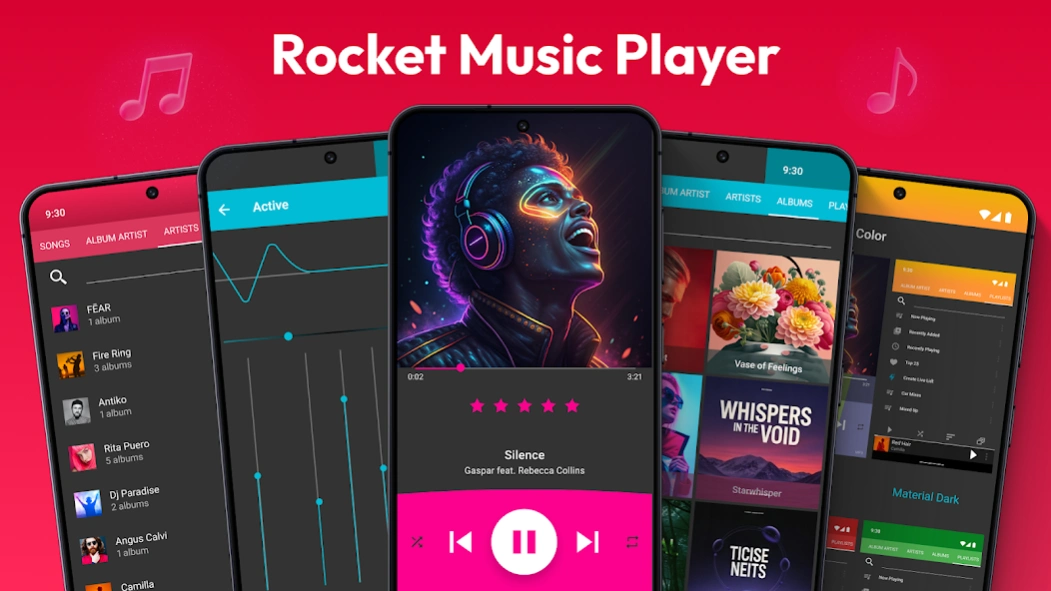


Android's most advanced music player & audio player! ♬
We know how important your music is for you, so our simple but powerful Rocket Music Player will make this an enjoyable Music Player experience. Enjoy your music with the best music player.
Rocket Music Player Features:
🎵 Display by song, album, artist, playlist, composer, genre, and more!
🎵 Band graphic equalizer including Bass Booster
🎵 30+ themes
🎵 Embedded lyrics
🎵 Tag Editing
🎵 Play many formats (wav, ogg, mp3, 3gp, mp4, m4a, alac, tta, ape, mpc, FLAC, WV, and WMA )
🎵 Batch selection – for selecting multiple songs at once to add to playlist, eq
🎵 Custom lock screen
🎵 Sleep timer
🎵 Podcast bookmarks
🎵 Scrobbling support
🎵 Chromecast support
🎵 Android Auto support
Powerful & beautiful Music Player
Enjoy your music with a beautiful user interface. You can choose a color theme or player theme you like in our MP3 player. Rocket Music Player - Mp3 Player is a perfect choice for you.
Fantastic Audio & mp3 Player by JRT Studio! Discover beautiful themes and personalize Audio Player to fit all your needs! Your music sounds & looks gorgeous with our music player.
Subscribe to cloud features for:
• Playlist backup and restore between devices
• Ratings and play count backup and restore
Combine with iSyncr for metadata syncing back to iTunes
• Ratings
• Play counts
• Playlist changes
• Sync embedded lyrics
• Many more features
Enjoy music like never before with Android's most advanced Music Player!
Unique Music Player - Mp3 Player
Rocket Music Player became a default app for Android Audio Player throughout its history. Our Music Player is so rich in features that it's got a whole set of nicknames from our fantastic users: Audio Player for Android, Reproductor de Musica, Mp3 Player, Offline Music, or Rocket Player. Regardless of what you call it, once you
install Rocket Music Player, you receive an intelligent tool, making listening to music even more enjoyable!
Disclaimer:
iTunes is a trademark of Apple Inc., registered in the U.S. and other countries.
Play music and enjoy your favorite songs with powerful Rocket Music Player
About Rocket Music Player
The company that develops Rocket Music Player is JRT Studio Music Players. The latest version released by its developer is 6.3.2.2. This app was rated by 1 users of our site and has an average rating of 5.0.
To install Rocket Music Player on your Android device, just click the green Continue To App button above to start the installation process. The app is listed on our website since 2026-08-05 and was downloaded 326 times. We have already checked if the download link is safe, however for your own protection we recommend that you scan the downloaded app with your antivirus. Your antivirus may detect the Rocket Music Player as malware as malware if the download link to com.jrtstudio.AnotherMusicPlayer is broken.
How to install Rocket Music Player on your Android device:
- Click on the Continue To App button on our website. This will redirect you to Google Play.
- Once the Rocket Music Player is shown in the Google Play listing of your Android device, you can start its download and installation. Tap on the Install button located below the search bar and to the right of the app icon.
- A pop-up window with the permissions required by Rocket Music Player will be shown. Click on Accept to continue the process.
- Rocket Music Player will be downloaded onto your device, displaying a progress. Once the download completes, the installation will start and you'll get a notification after the installation is finished.
Program Details
System requirements
Download information
Pricing
Version History
version 6.3.2.2
posted on 2026-08-05
version 6.3.0.1
posted on 2026-02-06
** Fix large list loading
** Ignore ringtones in app folders permanently
** Fix rescan bug
** Prepare for Android API 30
** Allow genre filtering on the artist tab
** Updated translations
** Now you can turn off custom notifications and use the built-in Android notification instead
** Scanning fixes
** Fix for stars bug on some Samsung devices. I could only fix the default themes.
** Fixed some startup crashes on Android 11
** Added a few more languages
** Multi-delete tracks in playlists
version 5.17.46
posted on 2021-09-15
** Now you can turn off custom notifications and use the built-in Android notification instead
** Scanning fixes
** Fix for stars bug on some Samsung devices. I could only fix the default themes.
** Fixed some startup crashes on Android 11
** Added a few more languages
** Multi-delete tracks in playlists
** Add playlists and live lists as live list rules!
** Add "Folders" as a live list criteria
** Add the ability to set crossfading for normal, manual and shuffle track changes
version 5.17.12
posted on 2021-03-10
** Fix for stars bug on some Samsung devices. I could only fix the default themes.
** Fixed some startup crashes on Android 11
** Added a few more languages
** Multi-delete tracks in playlists
** Add playlists and live lists as live list rules!
** Add "Folders" as a live list criteria
** Add the ability to set crossfading for normal, manual and shuffle track changes
** Fixed a bug with Chromecast and going to the previous track
version 5.16.102
posted on 2021-02-18
** Multi-delete tracks in playlists
** Add playlists and live lists as live list rules!
** Add "Folders" as a live list criteria
** Add the ability to set crossfading for normal, manual and shuffle track changes
** Fixed a bug with Chromecast and going to the previous track
** Fixed some issues with large libraries. They should update faster and use less processing power now.
** Filter bar in more places
** Minimalist mode now removes the filter bar
** Smoother animations
version 5.16.70
posted on 2021-01-13
** Add playlists and live lists as live list rules!
** Add "Folders" as a live list criteria
** Add the ability to set crossfading for normal, manual and shuffle track changes
** Fixed a bug with Chromecast and going to the previous track
** Fixed some issues with large libraries. They should update faster and use less processing power now.
** Filter bar in more places
** Minimalist mode now removes the filter bar
** Smoother animations
version 5.16.52
posted on 2020-12-05
** Add "Folders" as a live list criteria
** Add the ability to set crossfading for normal, manual and shuffle track changes
** Fixed a bug with Chromecast and going to the previous track
** Fixed some issues with large libraries. They should update faster and use less processing power now.
** Filter bar in more places
** Minimalist mode now removes the filter bar
** Smoother animations
** Fix for shuffling from a song not playing that song first and the shuffling songs after
version 5.16.24
posted on 2020-11-16
Email MusicPlayer@jrtstudio.com for support.
** Fixed some issues with large libraries. They should update faster and use less processing power now.
** Filter bar in more places
** Minimalist mode now removes the filter bar
** Smoother animations
** Fix for shuffling from a song not playing that song first and the shuffling songs after
** Samsung users on Android 10 get forced rescans to help with metadata issues
** Fixes for most common crashes
** Fix repetitive dialog for some users
version 5.15.124
posted on 2020-10-22
Email MusicPlayer@jrtstudio.com for support.
** Filter bar in more places
** Minimalist mode now removes the filter bar
** Smoother animations
** Fix for shuffling from a song not playing that song first and the shuffling songs after
** Samsung users on Android 10 get forced rescans to help with metadata issues
** Fixes for most common crashes
** Fix repetitive dialog for some users
** Fix playlist re-ordering bug
** Re-re-wrote the folder view.
** Fix media scanner
** Chromecast fixes
version 5.13.100
posted on 2020-08-13
Email MusicPlayer@jrtstudio.com for support.
** Fixes nasty startup crash
** Samsung users on Android 10 get forced rescans to help with metadata issues
** Fixes for most common crashes
** Fix repetitive dialog for some users
** Fix playlist re-ordering bug
** Re-re-wrote the folder view.
** Fix media scanner
** Chromecast fixes
** GDPR dialog fix
** Delete video UI fix
** Resizable widgets
** Configurable widgets
** Smoother scrolling
** Chromecast album art fix
